Continuity View
AICTX Continuity View is the fastest way to see what a future agent will inherit from the repository. It renders current operational continuity as local Markdown and Mermaid: active Work State, handoffs, failures, execution contracts, execution summaries, RepoMap hints, working-tree changes, and portable continuity status.
Short claim:
AICTX makes repo continuity inspectable.
Technical claim:
Generate a local, deterministic Mermaid map of active coding-agent continuity.
Continuity View shows the current operational continuity of the repository, not just the latest run.
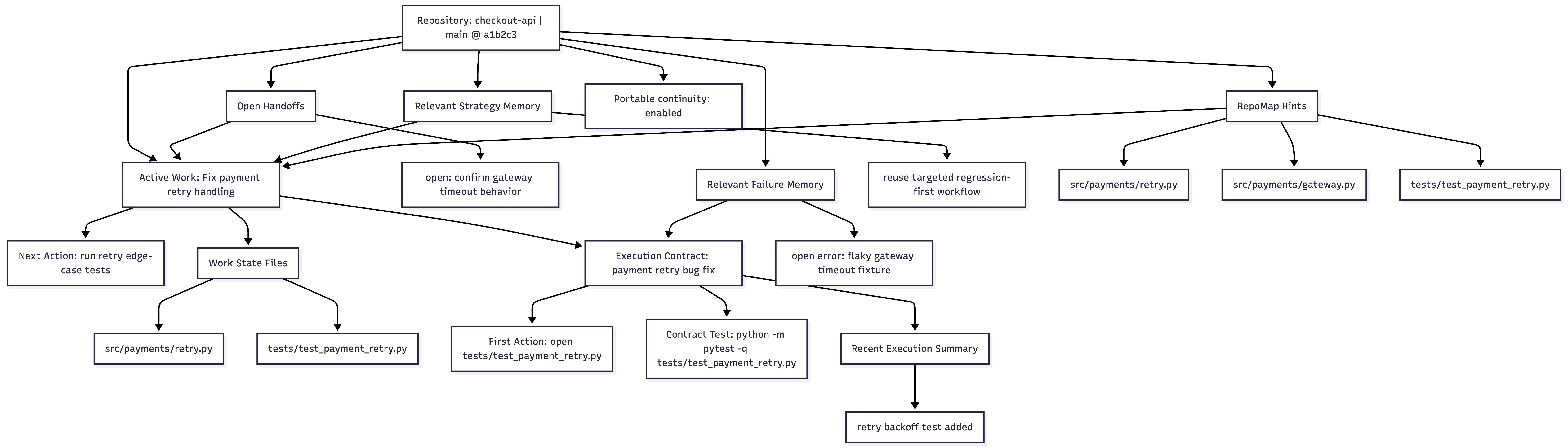
Open the image asset · Real example

Why it exists
AICTX already stores useful continuity across sessions: Work State, handoffs, decisions, failures, execution summaries, execution contracts, optional RepoMap hints, and bounded internal hints derived from prior strategy/area signals.
That evidence can be distributed across several repo-local artifacts and runtime outputs. Continuity View gives users and agents one stable place to inspect the current operational state:
.aictx/reports/continuity-view.md
.aictx/reports/continuity-map.mmd
Use it when you want to answer:
What continuity exists now in this repo so the next coding agent does not start cold?
It is not a generic graph viewer, dashboard, knowledge base, or replacement for resume. It is a deterministic continuity report generated from existing AICTX state.
Continuity Quality
AICTX treats repo-local memory as operational evidence, not permanent truth. aictx resume, aictx doctor, and MCP expose a Continuity Quality report that scores whether current continuity is fresh, inspectable, and verifiable.
The generated Continuity View Markdown includes a compact ## Continuity Quality section with the score, status, advisory flag, status counts, and up to three warning/error issues. It does not embed the full JSON report. The full report is available through aictx resume --json, aictx doctor --json, the MCP aictx_continuity_quality tool, and the aictx://repo/current/continuity-quality resource.
Default age thresholds are advisory:
fresh: updated within 7 dayspossibly_stale: updated within 30 daysdemoted: older than 30 days but not older than 90 daysobsolete: older than 90 days
These statuses do not delete artifacts. They guide agents on whether continuity should be treated as primary guidance or background evidence.
A newly generated execution contract can be pending_validation_for_new_contract. That is informational. It means validation has not happened yet.
missing_validation_evidence is different: it means older carried continuity expected validation evidence but none was recorded. Agents should treat that as a real risk before relying on the carried context.
Quality warnings include missing RepoMap or Continuity View data, stale handoffs, decisions or failures that reference deleted files, and missing validation evidence for carried continuity.
What the view contains
The generated Markdown includes:
- repository metadata;
- overview with active task, next action, risk, changed files, last execution, handoffs, failures, execution contract, and portability status;
- embedded Mermaid Continuity Map;
- working-tree changes;
- active, paused, or blocked Work State details;
- open handoffs;
- relevant failure memory;
- internal strategy hints;
- internal area hints;
- latest compatible execution contract;
- recent execution summaries;
- RepoMap hints;
- portable continuity status;
- notes for the next agent.
The Mermaid map uses bounded groups and stable node order. It is meant to show continuity that is active or relevant, not every historical memory row.
Who generates the Mermaid diagram?
AICTX generates the Mermaid diagram deterministically from repo-local continuity artifacts.
The coding agent may trigger generation with:
aictx view
aictx finalize --include-view
but it does not author the graph manually.
Canonical rule:
The agent triggers it. AICTX generates it. Mermaid is deterministic.
This preserves reproducibility, factuality, auditability, and Git-reviewable output.
Agents should not invent nodes, omit relevant failures manually, draw Mermaid in final summaries, or use unpersisted chat context as the graph source.
Generate the view
From an initialized repository:
aictx view --repo .
Default output:
AICTX Continuity View generated.

Markdown view:
.aictx/reports/continuity-view.md

Mermaid map:
.aictx/reports/continuity-map.mmd
The Markdown view embeds the Mermaid diagram and then lists the same continuity groups as readable sections.
Generate Mermaid only
aictx view --repo . --mermaid
This prints Mermaid only, without Markdown fences, and updates:
.aictx/reports/continuity-map.mmd
Use this when you want to paste the diagram into a Mermaid renderer or inspect the graph output directly.
JSON output
aictx view --repo . --json
Example shape:
{
  "ok": true,
  "view": {
    "markdown_path": ".aictx/reports/continuity-view.md",
    "mermaid_path": ".aictx/reports/continuity-map.mmd",
    "generated_at": "2026-05-17T19:23:37Z"
  },
  "summary": {
    "active_work_state": false,
    "changed_files": 11,
    "open_handoffs": 3,
    "relevant_failures": 1,
    "strategies": 3,
    "area_memory": 5,
    "execution_contracts": 1,
    "execution_summaries": 3,
    "repomap_hints": 5,
    "portable_continuity": "local-only"
  }
}
active_work_state is true only when an actual active Work State is loaded. Paused or blocked carryover can still appear in the view as Paused Work or Blocked Work, but it is not reported as the current active task.
Custom Markdown output
aictx view --repo . --output custom-continuity-view.md
This writes the Markdown view to the requested path and keeps the Mermaid map at the default stable path unless a future map-output option is used.
Include the view after finalize
A finalized session can leave behind an inspectable Continuity View for the next agent:
aictx finalize --repo . --status success --summary "targeted tests passed" --include-view --json
--include-view runs normal finalization, generates or updates the Continuity View, and adds stable links to the final summary. It does not insert the full diagram into the summary by default.
The final AICTX summary can include both the local .mmd link and a mermaid.live online view link generated from the deterministic Mermaid payload:
Continuity view file: [continuity-map.mmd](.aictx/reports/continuity-map.mmd)
View continuity online: [mermaid.live view](https://mermaid.live/view#pako:...)
Agents should preserve those links when appending the AICTX final summary to their user-facing response. They should not replace the URL with a placeholder, manually reconstruct the pako URL, or draw their own Mermaid diagram.
Resume integration
aictx resume --json reports whether the latest Continuity View exists:
{
  "continuity_view": {
    "exists": true,
    "markdown_path": ".aictx/reports/continuity-view.md",
    "mermaid_path": ".aictx/reports/continuity-map.mmd",
    "generated_at": "2026-05-17T19:23:37Z"
  }
}
If no view exists yet, resume reports the expected paths and does not regenerate the view automatically.
Data sources
Continuity View builds one normalized model from repo-local facts, then renders both Markdown and Mermaid from that same model.
Sources can include:
| Source | How it appears |
|---|---|
| Working tree | Changed-file count and bounded changed-file list |
| Work State | Active, paused, or blocked work, next action, risk, files, validation commands |
| Execution contract | Latest compatible contract, first action, canonical test command |
| Execution summaries | Recent finalization summaries |
| Handoffs | Open or active handoffs and next steps |
| Failure Memory | Relevant unresolved or recent failure patterns |
| Internal strategy hints | Reusable prior execution strategies, shown only as bounded diagnostic hints |
| Internal area hints | Repo areas with execution/failure/strategy signal, shown only as bounded diagnostic hints |
| RepoMap | Optional structural path and symbol hints |
| Portability state | Portable continuity status and mode |
Active task semantics
Continuity View separates an actual active task from carryover work:
Active taskin the Overview means AICTX loaded an active Work State.- A recent paused or blocked Work State may still appear as
Paused WorkorBlocked Workin the map and Work State section. - Paused/blocked carryover is operationally useful, but it is not labeled as the current active task.
This distinction keeps the Overview accurate while still making unresolved continuity visible.
Empty or partial continuity
The command is safe in repositories with partial data. If no operational signal exists, AICTX still writes a valid view with a small Mermaid graph:
flowchart TD
  Repo["Repository Continuity"] --> Empty["No active continuity signals found"]
Missing RepoMap, failure memory, handoffs, or Work State are rendered as unavailable or None instead of failing the command.
Review and portability
The default stable paths live under .aictx/reports/:
.aictx/reports/continuity-view.md
.aictx/reports/continuity-map.mmd
Whether those files are local-only or Git-portable follows the repository’s AICTX portability policy and ignore configuration. The files are plain text, so they can be reviewed, linked, archived, or copied into issue/PR discussions when appropriate.